Onboarding Offboarding Tenant
Process
New residents at Zeta House go through a multi-step process before they are admitted into Zeta House.
Application
Direct lease residents have to first apply at https://zeta.house/apply.
Here they submit a form that asks them for:
- Full Name
- Phone Number
- Key Qualifiers
- Compatibility
- Practical Considerations
- Booking Logistics
The application form will be sent back to the email address provided, and
enquiry@zeta.house will also be notified.
This information gets saved into a database owned by Zeta-House-Docs.
Application Review
Applications will be listed on the lease management page.
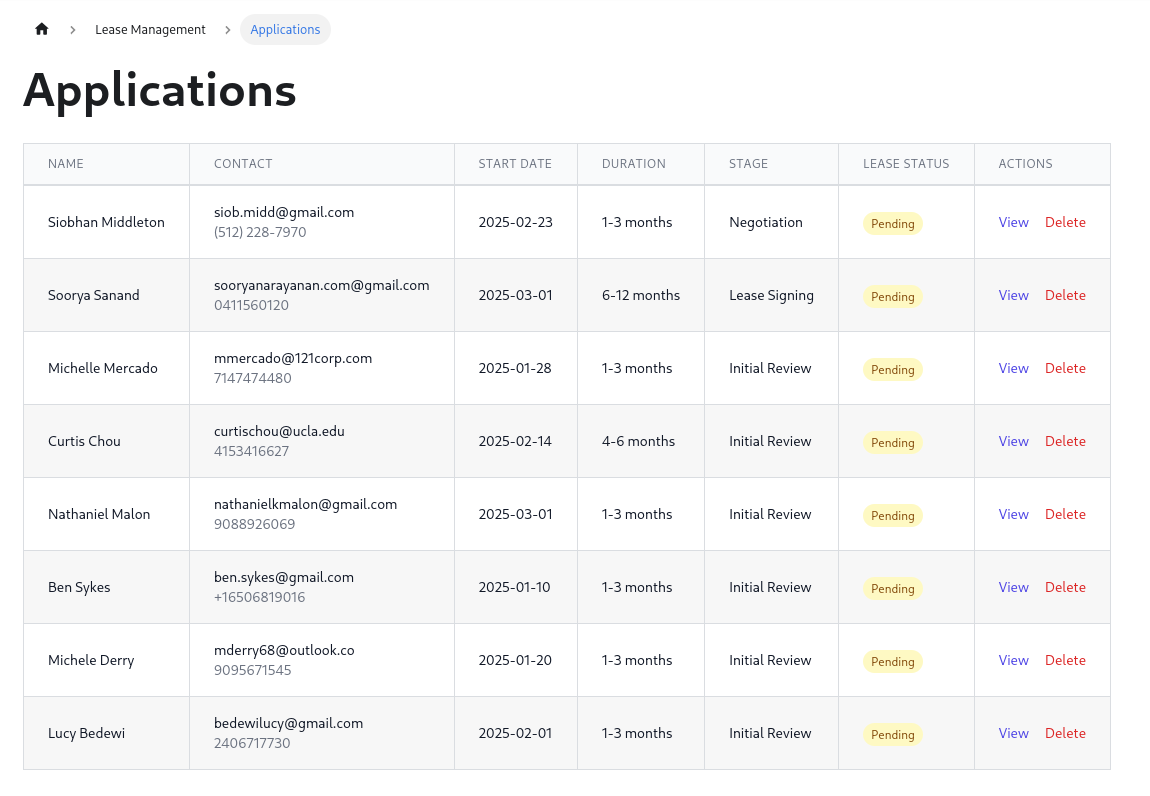
Clicking into each application will show an application details page:
- Application Details
- Application Stage
- Application Conversation
The stages are:
- Negotiation
- Lease Signing
- Security Deposit
- Lease Start
- Lease End
Each stage has several possible actions.
Negotiation
We have to negotiate the exact terms of the lease, so this means figuring out:
- Updating the applicant details in case the information was incorrectly entered or there was typos.
- Do we want to have this person as a resident? This is just a yes/no binary thing. If no, we have to reject the applicant, but it actually can be easy as saying that we have no availability atm.
- Do we have availability? Their proposed stay date and length needs to be
figured out. The application form doesn't have any specific rules, so they can
ask for anything. But we would need to check our combined calendar to see if
it's possible. We have to respond with an "offer". Say like, our room A1 is
available from X to Y for Z months. This can happen often because they don't
know which rooms are booked, so they may ask for B1/B2 but the rooms are
occupied but C1 and A2 is available.
- To figure out this answer, I'm going to avoid logical rules first. And instead have another page /calendar that shows the google calendar with the synchronised airbnb dates too, together, and the human user can eyeball it, and then respond with an email about an "offer".
- Making the offer means responding to their application email. What we can do here is to have the initial response email be ccing enquiry@zeta.house first (and then we would respond to that email directly to the person). This would be a manual effort.
- On a second phase, we can develop the in-app communication system, so that we can send and receive emails right there.
- In our offer, we not only provide what our intended availabilities are (and this is human written with the help of chatgpt specialized bot), but we also ask for a tour.
- The tour again has to be negotiated. It can be in-person, or over a call. We would prefer a call. The call can be done over Google Meets/Zoom/WhatsApp. We would ideally have them "schedule a meeting" with us. This could be connected to the calendar as well, but we wouldn't want to do it on the zeta house lease calendar, since that would impact the airbnb calendar, it would need to be on a separate one, and then that would schedule a meeting. This can be a separate issue, for now we can assume this happens off-this-system.
TBD:
- Provide a guide for the "interview" - what to ask for, what to present, important information, how to sell the place, qualifiers... etc.
The goal of this stage is to ascertain a "commitment" - when are they going to be here, and for how long.
Lease Signing
Lease Signing - Once the negotiation has occurred, and both the prospective tenant and ourselves have had a chat and all terms have been understood, then it's time to "fill" out the lease form, and then send them to sign using OpenSign.
- Note that we do not sign the agreement, because the agreement is already signed by us. This was to simplify things. So we actually just fill with the information.
- There are several properties that should be defaulted now, they can however be
overridden.
- Rent Amount (each room has different) (and note that when the lease changes
to 6 months or 12 months, the amounts change too)
- Office Amount - $600
- Cleaning - $200
- Guest Fee ($30)
- Cleaning Fee ($120, $100, $90)
- Pet Fee $15
- Rent Amount (each room has different) (and note that when the lease changes
to 6 months or 12 months, the amounts change too)
- The dates and room has to be selected BY the user. So that means under
Lease Signingstage, you have to provide these as "form inputs" that allow the user to specify these. This data is first created under a database entry (with a transactional operation) that also creates the lease under OpenSign and sends it to the designated email.- If the lease fails for some reason, you need to cancel the transaction (not sure if you can do this with PostGREST, you may actually need to do a SQL connection instead, requiring a DB key), can you research this.
- Sending the lease email right now can be done directly by OpenSign, but we can also send a sendgrid email or using the conversation interface, which will then WAIT for the lease to be signed. At this point the person may refuse or ask for things to change.
- This means we can in fact update the terms of the lease and resend it. Until at least 1 lease is signed, then we are always still in the Lease Signing stage.
TBD:
- Stage actions here can request updates to the lease agreement. So sometimes people read the lease agreement and then think, actually I want to stay shorter or longer, or have a different room... etc etc.
- The goal here is to have the lease signed.
- Even if the lease is signed, it's not active until the security deposit is paid.
Security Deposit
- Security Deposit - Now that the lease is signed. A security deposit invoice is
issued. This needs to use the Xero API and fill out the information in the
invoice and ask them to pay.
- Use the Xero API and/or Stripe API with webhook to know if the invoice was paid. Until it is paid, send a reminder once a day for them to pay. This can technically be automated inside Xero I think. Check the API for this capability.
- When it is paid, the lease is now locked in. A lease event must be created in the unified calendar. This now needs to sync up to Airbnb too to block those days.
TBD:
The 3 main ways of accepting payment are: card, bank transfer and ACH debit. The bank transfer and ACH debit has potential for the workflow not to be fully automated. And so may require a manual reconciliation.
In some cases you must remind them for payment.
Lease Start
- At this point, the first invoice can be sent. It is due 3 days prior to when the lease starts. If the lease started already, then it has to be sent.
- Again reminder every day to pay (as soon as it is overdue too).
During this specific stage, stage actions include the ability to change the lease:
- So that means terminating the lease. (Normally a regular termination is simply automated, but a manual termination is due to exceptions.)
- Or updating the lease (is like terminating and starting a new lease) - this has to hav a specific date in the future for the "update".
Lease End
- At this point, final invoices are sent.
- Payments for fees.
- Damages - (requires an inspection).
- Reviews
- Outgoing procedure (TBD specify outgoing)
- Google Review for Direct Leases - send a google review link